
Using computers to recognize handwritten text was always quite a challenge and did not yield satisfying results in the past. We have reached a point where this works much better now. This is an important turning point for work on the vast amount of handwritten material that was passed down to us over the centuries.
OCR vs. HTR
When using Computer Vision to recognize printed or handwritten text we talk about Optical Character Recognition (OCR). Nowadays, OCR for printed text is pretty much a solved problem. Machine Learning (learning from data and generalize to unseen data) was useful for this for years already without users knowing this or thinking about it. Still, this might have worked better or less good depending on the text. Training your own models for printed text OCR would be the topic of another article.
Recognizing handwritten text is also called Handwritten Text Recognition (HTR). In contrast to printed text this remained quite a challenge. This is due to the larger variations in scripts and the vast amount of different hands that write characters differently. For OCR there is very little variation from a letter in one part of the document to the same letter in another part. At least when we are using the same font – minus print artifacts. Also, there is a limited number of fonts to typeset print or at least not so much variation between fonts. For statistical models it is then easier to generalize from trained data to unseen material. This is much harder for handwritten text.
Why use HTR?
Without HTR if you want to go beyond a depiction of the text you have to transcribe the text yourself. This is both very time consuming and also quite tedious. With HTR you could skip the manual transcription stage entirely but the result will likely not conform to your quality expectations. So essentially HTR is a great help in the transcription stage. You can use HTR for the first stage and then as human do the correction pass(es). For this it is important that HTR does not make too many mistakes. Otherwise the correction quickly deteriorates into a re-transcription which makes the process tedious again. This may be even more frustrating than without HTR.
In theory, you could also use HTR for scripts you are not able to read yourself like e.g. Kurrent, which not many persons are still able to read today. In practice this will be difficult. HTR will probably not yield a satisfying result on new material without training a specialized model. That training requires humans that are able to read the text. More about that later.
Transkribus
One of the promising HTR services where I have followed its development for over 5 years now is Transkribus. It started as a research project at the University of Innsbruck. Now it is organized as an European cooperative read coop. They were also one of the partners at the Digitise.Transform.Inspire conference I visited. At first they had a Java client and server infrastructure. Now they use a web app and offer an API for integration in your own workflows.
One of the problems in the earlier years was that there were not really any models that were trained on a sufficient amount of data to yield acceptable results. This has changed in the last years. Now they offer models for both print and handwritten text recognition in various languages that offer a good baseline. By using those models as base you are able to train your own models on your own material to produce specialized models for your use cases. This is known as transfer learning. When applied with a deep neural network the base layers that have been trained on a large dataset stay unmodified whereas the more specialized layers get adjusted or replaced (fine-tuning). This is much easier and computationally cheaper for more specialized tasks in the same domain.
One important detail is that their service is credits-based. Doing text recognition costs you credits. You get a limited amount of free credits and there are also several pricing plans and the possibility to top up credits for a one-time payment. I’m not able to judge if their pricing is particularly cheap or expensive.
An example use case
I have a corpus of handwritten text from the 18th century of roughly 2376 pages. Not all pages are fully covered with text. I want to transcribe the pages. Later I also want to annotate them, but this is a different story. The text is written by one hand in 99% of the cases. It is tabular and quite uniform. It uses a similar structure and wording throughout. Most of the variation comes from person and location names and professions. It was created for genealogical purposes.

The example shows that the text is a mix of German and Latin. Similarly, it is also a mix of German and Latin script. It also features quite some abbreviations. Transcription now requires 3 steps: drawing the table layout, drawing the lines and transcribing the text.
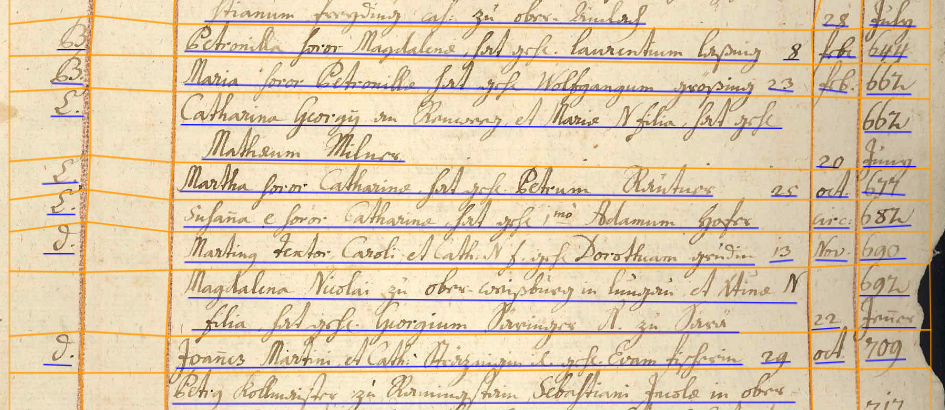
This then looks like in the image above. Yellow lines show the table grid while blue lines show the text lines. Each step, adding table grid, detecting text lines and transcribing text can be done with a specific model.
I tried doing this with the generic models but the result was not satisfactory. The only exception was the detection of text lines.
Training your own model
As mentioned you can train your own models, but you need input data for it. For this you have to do the mentioned steps manually first. The minimum amount of pages required to train a table model is 20 pages. So I picked 20 random pages from the corpus where text was filling the page. I then added the table grid and the text lines via the web interface. After that I transcribed the text. For this you obviously have to be able to read it. I then checked that the transcription was correct and trained a text recognition model and table model on the data.
There you have to select a training data size and a validation data size. The training process performs recognition on the validation data and compares the result to the manually entered data. This shows how good the model performs. The default validation data size is 10% and I left it at that. So I had 18 pages as training data and 2 pages as validation data for both models.
For the text recognition model the result was a Character Error Rate (CER) of 5.6%. The table recognition model had a Mean Average Precision (mAP) of 37.73%. For mAP Transkribus writes that it “… is a complex measure that evaluates how accurately the system detects the tables, considering whether they were detected, and how well their size and shape match the validation data.” They go on to explain that mAP values of over 60% are likely satisfactory.
Testing the models
The text recognition model performed quite good. Some portions were completely accurate. Other portions had added letters in between. There also were some parts that were bad but no real garbled text. Since the model was only trained on the main hand the recognition completely deteriorated when it encountered another hand it was not trained on.

You see an example for this in the image above. While recognition worked fine on the first entry, it produced non-satisfactory results on the second entry.
The results for the table recognition were a bit more mixed. Sometimes the table recognition did not produce any output at all. When you just spent one credit on recognition this is a bit frustrating. But all in all it did work okay. In the text there are a lot of skewed lines. This led to some omitted entries or some where recognition did not work correctly. The recognition also often placed the table grid too close to the text, which was a problem for line recognition.
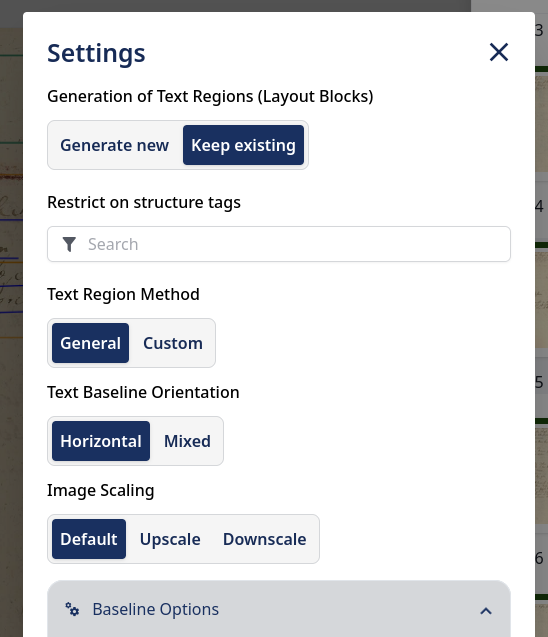
A major problem occurred with the default settings for layout (or text line) recognition. When I first used it all of the table grid was gone. There seems to be no option to undo the results of a recognition run – at least I did not find a way to do this. (There is a version history functionality where you also can restore specific versions.) This was really frustrating because then you have to remove everything and re-do (and spent credits on) the table recognition. It turned out that by default the layout recognition has set “Generate New” for “Generation of Text Regions (Layout Blocks)” instead of “Keep Existing”. This hides in the “Advanced Settings” dialog. At least it stays set if it is set once.
Another setting that can be chosen is “Split lines on region border” in “Baseline Options”. This causes text lines to not cross the table layout lines. When using that you have to be careful to not have the table layout intersect text as this then would produce split parts which you then probably have to correct manually.
An iterative approach
I used the trained models to transcribe the first 70 pages of the material and made manual corrections where necessary. With that I could increase the input for model training to 80 pages training data and 8 pages validation data. I then trained the text recognition and table recognition models again. For the text recognition model the CER improved from 5.6% to 2.79%. In the table recognition model the mAP improved from 37.73% to 38.13%.
For the text recognition model this was a significant improvement. On the other hand, the improvement for the table recognition model was only marginal. I verified the performance of the new models with new pages. This confirmed the accuracy numbers. There was not really a noticeable improvement for the table recognition. In contrast, the text recognition performed better and made much less transcription errors.
I will continue to refine the models with more material as I go along.